
McDonald’s App Payment Greyed Out for McDelivery?Easy Fixes
If the payment option is greyed out in the McDonald’s menu app for McDelivery, it usually means the app cannot complete one part of the checkout process. This may happen because of a weak internet connection, an outdated app, a delivery address issue, an unavailable restaurant, a payment method problem, app cache bugs, or a temporary McDonald’s/Uber Eats delivery system issue.
The fastest fixes are: refresh the app, check your address, update the app, switch from Wi-Fi to mobile data, remove and re-add your payment method, clear the app cache, and try a different payment option.
Why Is McDonald’s App Payment Greyed Out for McDelivery?
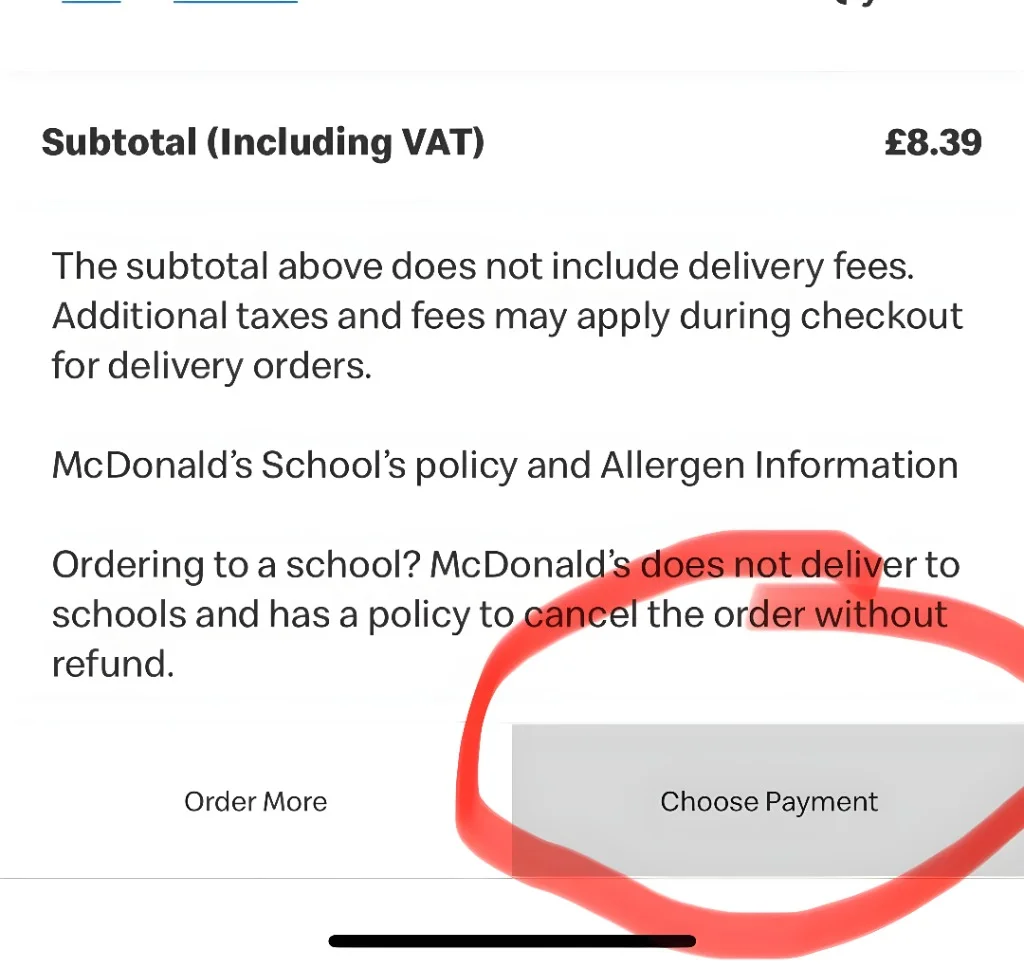
You open the McDonald’s app, add your favorite items, switch to McDelivery, and notice the McDonalds app payment greyed out. Annoying, right? The good news is that this issue is usually easy to fix. Most of the time, the app isn’t saying your card is invalid—it just means something is blocking the checkout process.
McDelivery relies on more than just McDonald’s. The app also checks your location, restaurant availability, menu items, delivery partner status, fees, payment method, and app connection. If any of these checks fail, the McDonald’s app payment greyed out problem can appear. Let’s explore the most common causes and the easiest fixes.
1. Your Delivery Address Is Not Confirmed
One of the biggest reasons the payment button stays greyed out is an address problem. McDelivery needs a valid delivery address before it can calculate your order total, delivery fee, service fee, taxes, and delivery availability. If the app cannot confirm your address, it may not let you choose payment.
How to Fix It
Go back to the delivery address section and check:
If your address is saved already, delete it and enter it again. This can refresh the delivery check. Also, make sure you selected McDelivery, not pickup. Sometimes the app keeps old pickup settings in the background, and that can confuse checkout.
2. McDelivery Is Not Available in Your Area
McDelivery is not available everywhere. Even if a McDonald’s restaurant is close to you, it may not offer delivery through the app at that time. Delivery availability can change based on:
If delivery is not available, the app may still let you browse the menu, but payment may stay greyed out at checkout.
How to Fix It
Try changing your delivery address slightly if you are near a boundary area. For example, use your exact building name, flat number, or a nearby landmark. You can also try again later. If the restaurant is busy or delivery drivers are limited, McDelivery may come back after some time.
3. The Restaurant Is Closed or Too Busy
The app may show a restaurant, but that does not always mean it is ready to accept delivery orders. A restaurant may pause McDelivery if it is closed, overloaded, short-staffed, or having system issues. When this happens, checkout can become stuck, and the payment option may be disabled.
How to Fix It
Go back to the restaurant selection screen and choose another nearby McDonald’s if the app gives you that option. You can also remove your items and start a new McDelivery order from the beginning. This forces the app to check current restaurant availability again.
4. Some Items in Your Basket Are Not Available for Delivery
Not every menu item is available for every McDelivery order. Some items may be pickup-only, out of stock, breakfast-only, lunch-only, or unavailable at your selected restaurant. If your basket contains an unavailable item, the app may stop you from paying.
How to Fix It
Open your basket and look for any warning message. Remove items that look unavailable or greyed out. A simple trick is to empty your basket and add one basic item, such as fries or a drink. Then go to checkout. If the payment button works, one of your original items was likely the problem.
5. Your McDonald’s App Needs an Update
Old app versions can cause checkout bugs. Payment pages are sensitive because they connect with banks, wallets, delivery services, and restaurant systems. If your app is outdated, the payment section may not load correctly.
How to Fix It
Go to the App Store or Google Play Store and search for the McDonald’s app. If you see an update button, update it. After updating, fully close the app and open it again. Do not just minimize it. Restarting the app helps reload the checkout page properly.
6. The App Cache Is Causing a Bug
Apps store temporary data to load faster. This is called cache. Over time, cached data can become old or broken. When that happens, the McDonald’s app may show wrong prices, unavailable items, or a greyed-out payment button.
How to Fix It on Android
- Open your phone settings.
- Go to Apps.
- Find McDonald’s.
- Tap Storage.
- Tap Clear Cache.
- Reopen the app.
Avoid clearing all data unless you are okay with signing in again.
How to Fix It on iPhone
iPhone does not have the same clear cache button for most apps. The easiest fix is:
- Close the McDonald’s app.
- Restart your iPhone.
- Update the app.
- If the issue remains, uninstall and reinstall the app.
Reinstalling gives the app a fresh start.
7. Your Internet Connection Is Weak
A weak connection can stop the payment section from loading. This is common when you are using public Wi-Fi, restaurant Wi-Fi, underground transport, or a weak mobile signal. The menu may load, but the payment system may fail because it needs a secure connection.
How to Fix It
Try these quick steps:
After that, close and reopen the McDonald’s app.
8. Your Payment Method Is Not Accepted
The McDonald’s app accepts certain cards and digital wallets depending on your country. If your payment method is not supported for McDelivery, expired, blocked, or not verified, the payment option may not work. Sometimes a card works for pickup but not for delivery. This can happen because delivery orders may be processed differently depending on region and delivery partner.
How to Fix It
Try these steps:
- Remove your saved card.
- Add it again.
- Check the expiry date.
- Check the billing address.
- Try another card.
- Try Apple Pay or Google Pay if available.
- Make sure your bank is not blocking the payment.
If your bank sends security alerts, approve the payment and try again.
9. Apple Pay or Google Pay Is Not Set Up Correctly
If you use Apple Pay or Google Pay, the issue may be with your wallet setup, not the McDonald’s app. Your wallet payment may fail if:
How to Fix It
Open Apple Wallet or Google Wallet and check if your card is active. Try using the wallet for another small payment if possible. If it does not work elsewhere, fix the wallet first. Then come back to the McDonald’s app.
10. You Are Not Signed In Properly
The McDonald’s app may show your account, but your session could be expired in the background. When that happens, checkout may not work. This is common after app updates, password changes, or long periods without using the app.
How to Fix It
Sign out of the McDonald’s app, then sign back in. After signing in, rebuild your order instead of using the old basket. This helps avoid old checkout data.
11. Your VPN, Ad Blocker, or Private DNS Is Blocking the App
VPNs and ad blockers can sometimes block parts of the checkout process. The McDonald’s app may need to connect to payment, location, fraud-checking, and delivery systems. If something blocks those connections, payment may stay greyed out.
How to Fix It
Turn off:
Then close and reopen the McDonald’s app. This is especially useful if the app works on one phone but not another.
12. Location Permission Is Turned Off
McDelivery may need your location to check nearby restaurants and delivery availability. If location permission is off, the app may not confirm your order properly.
How to Fix It
Go to your phone settings and allow location access for the McDonald’s app. Choose “Allow While Using App” if you do not want location running all the time. Then reopen the app and select McDelivery again.
13. Your Basket Total Does Not Meet the Minimum Order Amount
Some areas may have a minimum order amount for delivery. If your basket is too small, the app may not let you continue to payment.
How to Fix It
Check the basket page for a minimum order message. Add one more item and see if the payment button becomes active. Also check if there are small order fees. These can vary by location.
14. A Promo Code or Reward Is Causing the Problem
Rewards and promo codes are great, but they can sometimes block checkout if they are expired, not valid for delivery, or not accepted at your selected restaurant. Some offers may work for pickup but not McDelivery.
How to Fix It
Remove the promo code or reward from your basket and try checkout again. If the payment button becomes active, the offer was likely the issue. You can try another deal or place the order without the promo.
15. McDonald’s or the Delivery Partner Has a Temporary Outage
Sometimes the problem is not your phone, card, or account. The McDonald’s app or delivery partner system may be having a temporary issue. Since McDelivery can be powered by delivery partners in many areas, the app depends on several systems working together.
How to Fix It
Wait a few minutes and try again. You can also check whether pickup works. If pickup works but McDelivery does not, the problem is probably related to delivery availability or the delivery partner. You can also try ordering through the delivery partner app, such as Uber Eats, if McDonald’s is available there in your area.
Fast Fix Checklist
Try these steps in this order:
- Close and reopen the McDonald’s app.
- Check your internet connection.
- Switch between Wi-Fi and mobile data.
- Confirm your delivery address.
- Remove unavailable items from your basket.
- Remove promo codes or rewards.
- Update the McDonald’s app.
- Clear cache on Android.
- Restart your phone.
- Remove and re-add your payment method.
- Try another card or digital wallet.
- Turn off VPN or ad blocker.
- Sign out and sign back in.
- Reinstall the app.
- Try again later or use pickup.
Most users can fix the McDonald’s app payment greyed out issue within a few minutes by following these simple steps.
What to Do If Pickup Works but McDelivery Does Not
This is an important clue. If payment works for pickup but not for McDelivery, your card is probably not the main issue. The problem is more likely connected to delivery. Possible causes include:
In this case, try a new delivery address, choose another restaurant, remove promos, or wait and try again later.
What to Do If McDelivery Works but Payment Still Does Not
If McDelivery is available but the payment option is still greyed out, focus on payment and app settings. Try:
Also check your bank app. Some banks block online food delivery payments until you approve them.
Should You Contact McDonald’s Support?
Yes, if you tried the basic fixes and the issue still happens. Contact app support when:
When contacting support, include:
This helps support find the problem faster.
Can You Still Order McDonald’s Without the App?
Yes. If the app keeps failing, you still have options. You can:
If you are hungry now, do not spend too long fighting the app. Use the fastest option available and fix the app later.
Tips to Avoid This Problem Next Time
Here are a few simple habits that can prevent McDelivery payment issues:
Small steps like these can save you from checkout problems later.
FAQs
Final Thoughts
When the McDonald’s app payment is greyed out for McDelivery, do not panic. It is usually a checkout issue, not a serious payment problem. Start with the easy fixes: refresh the app, check your address, update the app, remove unavailable items, and try another payment method. If pickup works but delivery does not, the issue is probably linked to McDelivery availability rather than your card. If nothing works, contact McDonald’s app support with a screenshot and try another ordering method for now.


